Admin Module

Display Active Plugins First

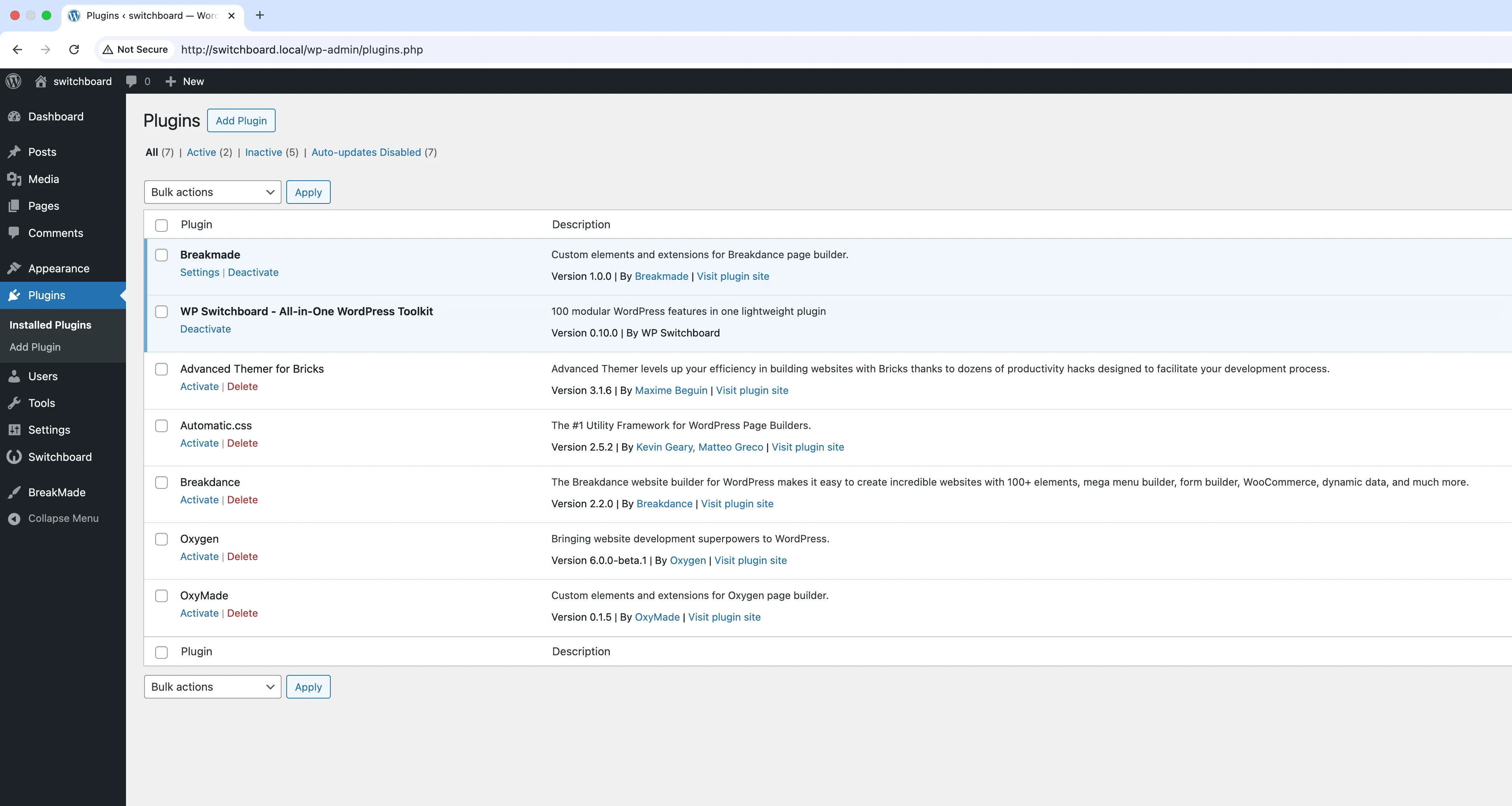
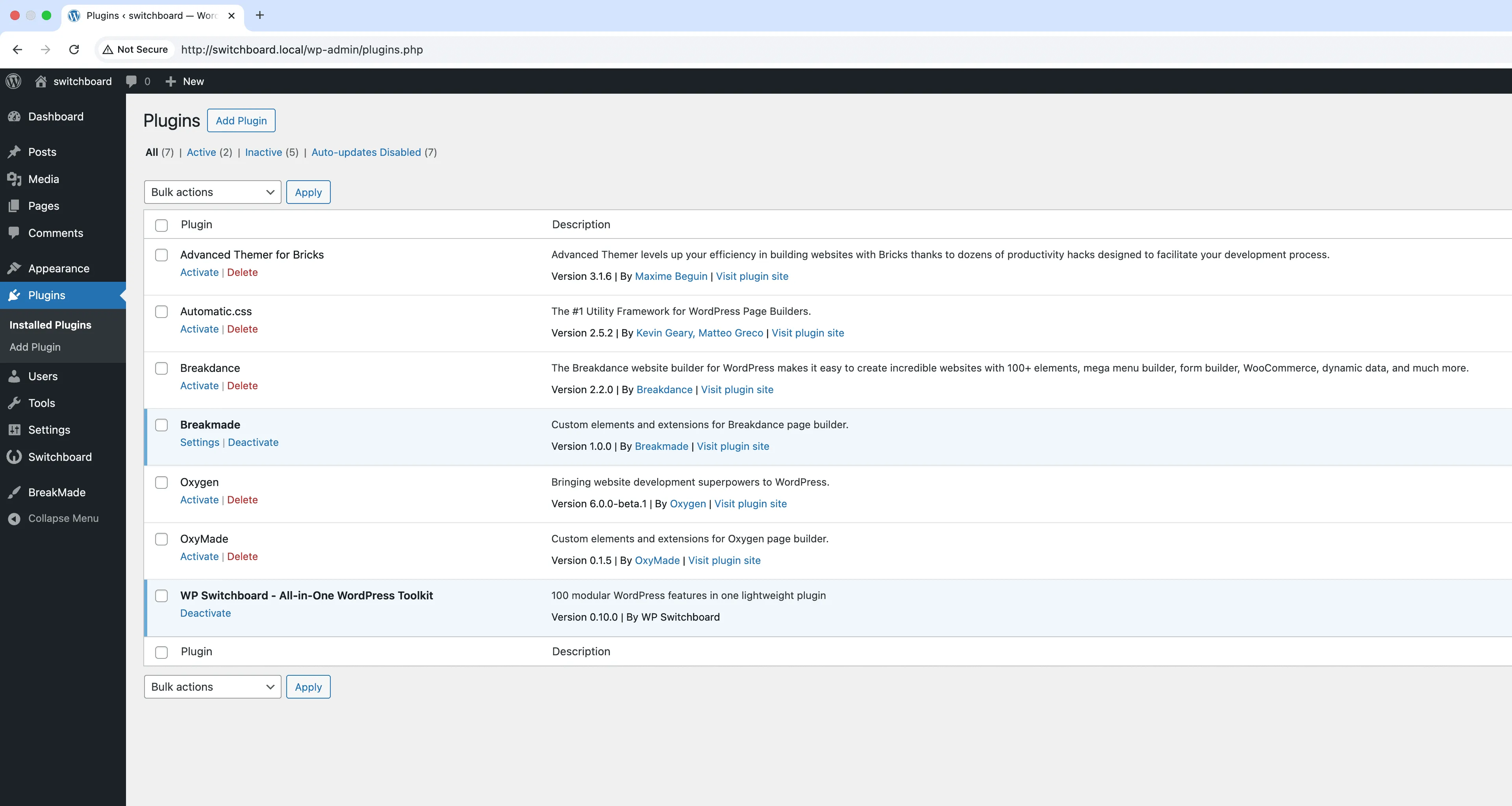
Display Active Plugins First reorganizes your WordPress plugins list to show all active plugins at the top, separated from inactive plugins by a visual divider. This simple change dramatically improves plugin management workflow, especially on sites with many plugins installed. Instead of scrolling through alphabetically sorted plugins mixing active and inactive together, you immediately see what is running on your site. The module works automatically with no configuration, simply reordering the existing plugins list view. This is particularly helpful when checking for plugin updates, troubleshooting conflicts, or auditing which plugins are actually in use versus just installed.

Before
Before - Display Active Plugins First module
Enlarge
After
After - Display Active Plugins First module
Enlarge
plugins admin sorting organization active

Display Active Plugins First Part of 165+ modules $349 $249

Get Lifetime Access

Key Features

Reorders plugins list to show active plugins first
Improves plugin management workflow
No configuration required

Why Use This Module?

  • Instantly see all running plugins without scrolling through inactive ones
  • Makes plugin updates faster by grouping active plugins that need attention
  • Simplifies troubleshooting by clearly showing what code is actually executing
  • Helps identify forgotten inactive plugins that should be deleted
  • Zero configuration required, works immediately upon activation

Real-World Use Cases

Managing 50+ Plugin Installation

On a multisite network with dozens of plugins, quickly locate active plugins without scrolling through a long list of inactive test plugins.

Agency Client Sites

When maintaining multiple client sites, instantly see which plugins are currently running versus archived ones you keep for reference.

Plugin Testing Workflow

Developers testing various plugins can easily distinguish between production-active plugins and experimental ones awaiting evaluation.

How to Use

Simply activate the module. Active plugins will automatically appear at the top of the plugins list.

Benefits & Impact

Time Savings

Automates manual tasks and streamlines your workflow

Performance Boost

Streamlines admin workflow and efficiency

Better UX

Provides a better user experience

Easy Maintenance

Simple setup with minimal ongoing maintenance

Frequently Asked Questions

Does this change anything about how plugins work?

No, this only changes the visual display order in the admin plugins list. Plugin functionality, load order, and everything else remains exactly the same.

Can I still sort plugins alphabetically?

The module groups active plugins first within their sorted order. You can still use the default WordPress sorting, but active plugins will appear at the top of each sorted group.

Does this work with multisite?

Yes, the module works on individual site plugin pages in a multisite network. Network-activated plugins follow their standard behavior.

What Users Are Saying

"I manage like 40 plugins across client sites. Having active ones at the top saves me from scrolling through inactive junk every time."

— Web Development Agency

"Such a small thing but I love it. No more hunting for that one plugin I need to update."

— Food Blog

"I've got 60+ plugins and the inactive ones were always in the way. This just makes sense."

— WooCommerce Store

Related Modules

ADMIN

Admin Color Schemes

Create custom admin color schemes with primary and secondary colors applied throughout WordPress dashboard including menu, buttons, links, and interface elements

admin colors themes +2
ADMIN

Admin Columns Manager

Manage, reorder, hide, and customize admin list table columns for all post types with drag-and-drop interface and custom fields support for developers

admin columns tables +2
ADMIN

Admin Logo Customizer

Upload custom logo for WordPress admin area to replace default WordPress branding throughout dashboard and create professional white-label client experience

admin logo branding +2
WPSwitchboard

165+ Modules.
One Plugin. Done.

Security, admin tools, performance, SEO, and more. All in one place.

Get Lifetime Access - $349 $249
Core Modules
165+
Admin Tools, Security, Optimization, and more
Enhance your WordPress admin experience
Admin Tools
Dashboard Enhancements
Customize admin interface
Security & Performance
Optimization Modules
Secure & optimize your site